
Shop Floor WIP Tracking with RTLS: A Production Planner’s Guide
Shop floor WIP tracking answers a simple question that most planners still cannot answer in real time: where is every job right now, and how long has it been waiting? This guide is written for production planners and line supervisors. It shows how to turn work-in-progress from a daily walk-round and a pile of job cards into live data, using BLE RTLS, in five practical steps. For the wider picture, start with our overview of RTLS in manufacturing workflows.
Why Planners Lose Sight of Work in Progress
WIP is every job that has started but not finished: parts on trolleys, bins at a station, racks of semi-finished goods. It is hard to see because it moves. Job cards get updated by hand, so they are late or wrong, and barcode scans only happen at fixed checkpoints, so you know where a job was, not where it is now. The cost shows up as queues, overtime and late orders. Lean practitioners such as the Lean Enterprise Institute treat excess WIP as a symptom of poor flow, because the longer a job waits, the longer the whole order takes.
How RTLS Makes Shop Floor WIP Tracking Automatic
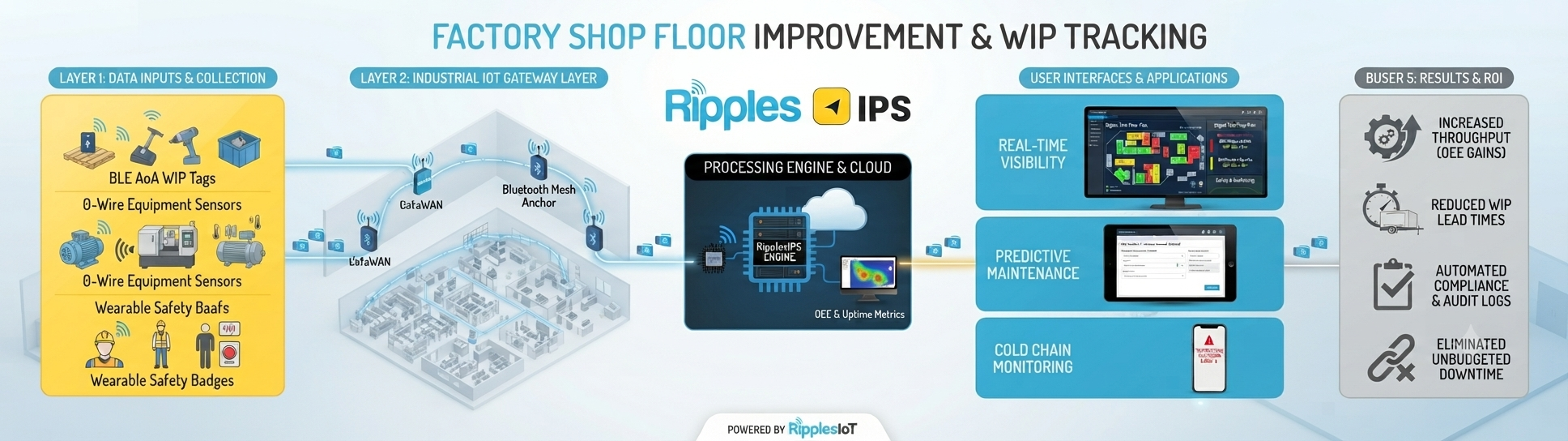
With RTLS, a small BLE tag travels with the trolley, bin or rack that carries the job. Gateways on the walls and columns detect the tag as it moves, and the platform records when it enters and leaves each zone. Nobody has to scan anything, so the data is continuous instead of occasional. A repair-workshop deployment described on our manufacturing page tracks WIP across seven repair stages without manual barcode scanning. To see how the hardware and mesh work, read how RipplesIPS works.
Step 1: Turn Each Production Stage into a Zone
List your stages in the order jobs flow, for example, cutting, machining, assembly, test and packing. Draw each as a zone on the floor plan, plus a zone for every buffer area between stages. Zone-level tracking is enough for WIP: you need to know which stage a job is in, not its exact position within the stage.
Step 2: Tag the Carriers, Not the Parts
Tag the things that move jobs around: trolleys, bins, racks and pallets. Link each tag to a work order when the job is released, so the system knows what the tag represents. If a job travels on several carriers, group the tags so that they report as one job; our page on group tracking of assets and inventory explains how grouping works. Tagging carriers keeps costs low and lets you reuse the tags on the next job.
Step 3: Set Dwell-Time Thresholds and Alerts
Dwell time is how long a tag stays in a zone, and it is the most useful WIP signal you have. Set a threshold for each stage based on its normal cycle time, and send an alert to the supervisor when a job exceeds it. Zone entries and dwell-time thresholds can also act as triggers in other systems, for example to tell the next station that material is ready. Start with only the two or three stages that cause the most delay, then add more.
Step 4: Feed Your MES, ERP or CMMS
RTLS data is most useful when it reaches the systems planners already use. RipplesIPS connects through REST API and MQTT to MES and ERP systems, including SAP and Microsoft Dynamics, and to CMMS platforms. That means a job moving into the test zone can update its status automatically, and a stalled job can raise a ticket. For maintenance workflows, see our group’s preventive maintenance CMMS software page.
Step 5: Build a Planner’s Dashboard
A dashboard turns tag data into decisions. Show the planner a count of jobs per stage, the longest-waiting job and the queue in front of your bottleneck machine. Choosing the right chart tool matters, and our guide to IoT data visualisation tools compares the options. If machine downtime is part of your WIP problem, add the real-time machine uptime tracking dashboard to the same screen.
The Five WIP Numbers to Watch
- Jobs in progress at each stage, compared with the limit you have set.
- Average dwell time per stage, compared with the planned cycle time.
- The longest-waiting job on the floor right now.
- The queue in front of your bottleneck machine.
- Jobs with no tag movement for a full shift, which usually means they are lost or blocked.
How Accurate Is BLE on a Metal-Heavy Floor?
Standard BLE mesh gives roughly 2 to 2.5 metres of accuracy, and angle-of-arrival (AoA) antennas reach sub-metre accuracy where you need it. The mesh self-heals around obstructions, which matters around metal machinery. That is accurate enough for zone-level WIP, and it is the reason to design by stages, not by exact coordinates. Read indoor positioning technology for the trade-offs between methods.
Starting Small on a Limited Budget
Pilot one production line first, and prove the value before you extend to the rest of the plant. Battery-powered, wire-free hardware avoids electrical work, and our RTLS deployment guide for SMEs walks through the survey, placement and go-live steps. Review RTLS pricing and starter kits or the industrial RTLS starter kit to size a pilot. Keep a few spare tags on site, and choose a cloud dashboard that works on a normal factory internet connection.
Shop Floor WIP Tracking Checklist
- List your stages and buffers, and draw each as a zone.
- Tag trolleys, bins and racks, and link each tag to a work order.
- Set a dwell-time threshold for the two or three slowest stages.
- Connect zone events to your MES, ERP or CMMS through REST API or MQTT.
- Build one planner’s dashboard with the five WIP numbers.
- Pilot on one line, review the results, then extend.
Next Step: Plan a WIP Pilot
If you would like to map your first line, review our IoT solutions for manufacturing or contact the Ripples team with a sketch of your stages.