


Pallet Tracking for Growing 3PLs and Mid-Size Warehouses
Most BLE pallet tracking is sold as an enterprise project — a site survey, an integrator, a multi-month rollout, and a WMS integration team on standby. That model makes sense for a 50,000 sqm distribution centre. It doesn’t fit a mid-size warehouse or a 3PL that’s outgrown spreadsheets but isn’t ready to commission an enterprise-scale implementation.
This is the gap Ripples IoT is built for: pallet tracking for 3PLs and growing warehouses that a small ops team can deploy themselves, with zero wiring, pre-configured gateways, and tags rated for four years of battery life — live in days, not months.
Why Mid-Size Warehouses and 3PLs Hit a Different Wall Than Enterprise Operators
A growing 3PL or a mid-size warehouse usually isn’t struggling with the same problems a 50,000 sqm facility has. The floor is smaller, the team is leaner, and everyone still mostly knows where things are — until volume, client count, or SKU variety cross a threshold where that stops being true.
Three problems show up consistently at this stage.
Client-mixed storage makes manual tracking fragile. A 3PL storing pallets for multiple clients in the same warehouse can’t rely on “everyone knows the layout” the way a single-owner warehouse can. Client A’s stock sitting in the wrong zone isn’t just an internal inconvenience — it’s a billing and SLA problem.
Growth outpaces the spreadsheet. A warehouse that worked fine on a shared spreadsheet at 500 pallets starts breaking down at 2,000, especially once a second or third client account is added. Location updates lag behind actual moves, and reconciliation becomes a weekly fire drill instead of a non-event.
Enterprise RTLS pricing and lead time don’t match the scale. A full enterprise deployment — site survey, integrator-led install, multi-week commissioning — is disproportionate to the pallet counts a mid-size operation is actually running. The result is that many growing warehouses stay on manual processes far longer than they should, simply because the available tracking systems are scoped for a much bigger operation.
The Starting Point: Paper, Memory, and Euro Pallets
A small 3PL operation like this typically runs on a few core habits that work fine right up until they don’t:
- Pallet location lives in someone’s head. The team member who’s been there longest usually knows where everything is — until they’re on leave, and nobody else does.
- Stock counts happen on paper, reconciled against a spreadsheet at the end of the shift or the end of the week, whichever comes first.
- FEFO dispatch is a judgment call, not a system rule — someone checks expiry dates manually before deciding what ships first, and near-misses happen more often than anyone wants to admit.
- Client visibility is a phone call. When a customer asks where their pallet is, someone has to walk the floor to find out, then call back.
What Changed With Real-Time Tracking
Tagging pallets with wireless BLE trackers didn’t require rewiring the facility or hiring anyone new — a handful of gateway nodes covered the whole site. What it changed:
- Pallet lookup stopped depending on one person’s memory. Any team member can now check a dashboard instead of asking around.
- FEFO dispatch became a system prompt, not a manual check. The dashboard flags what’s closest to expiry and should ship first — the judgment call became a lookup.
- Client status calls got faster. “Where’s our pallet?” now takes seconds to answer instead of a walk around the floor.
- Stock discrepancies surfaced immediately, not at the next scheduled count — a pallet that moved to the wrong zone got flagged the same day, not the next audit.
None of this required the kind of rollout a larger distribution centre would need. Tagging started with the highest-value and most frequently moved pallets first, and expanded from there.
What a Zero-Wire Pallet Tracking System for 3PLs Looks Like
Ripples IoT’s approach to pallet tracking for growing 3PLs removes the two biggest blockers to a mid-size operator adopting RTLS: installation complexity and cost scaled for enterprise deployments.
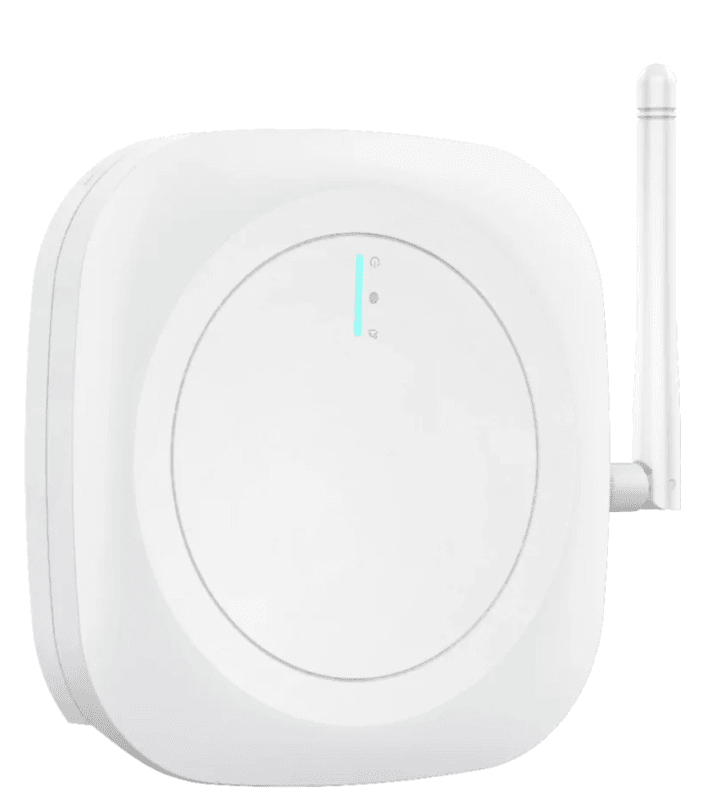
Zero wiring, no fixed infrastructure. There’s no cabling to run and no dependency on the building’s existing network. Gateways communicate wirelessly and mount anywhere with a standard power socket — no conduit, no electrician, no IT department sign-off required.
Pre-configured gateways. Gateways arrive ready to join the network out of the box. Mount it, power it, and it starts receiving tag data — there’s no on-site configuration step that requires a technician or an integrator visit. This is the single biggest difference between an enterprise RTLS rollout and a mid-size deployment: the same underlying platform, without the services overhead.
Do-it-yourself deployment. A small ops or warehouse management team can go from unboxing to a live dashboard without a professional services contract. Tag pallets, place gateways according to a straightforward layout guide, and the system starts populating location data. There’s no dedicated project manager and no multi-week commissioning schedule — deployment is measured in days.
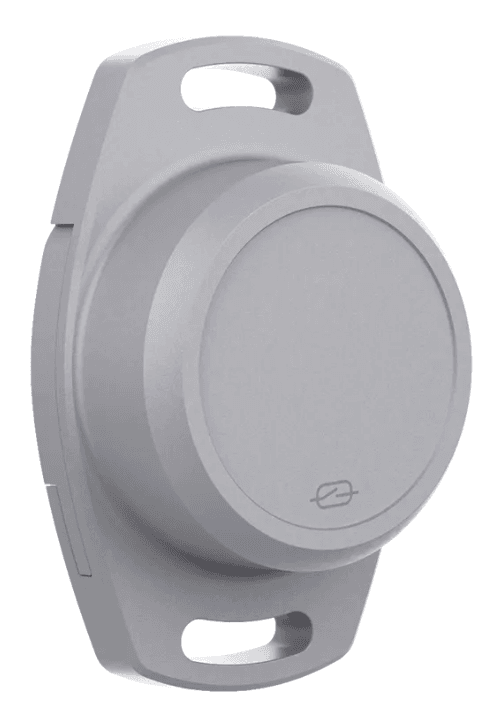
Tags built for growing operations, not enterprise budgets. Each pallet tag is IP67-rated for warehouse conditions and runs up to four years on a single battery. For a 3PL managing tag inventory across hundreds or low thousands of pallets, that battery life is the difference between tag maintenance being a background task and it becoming a recurring operational cost line.
What You Get With This Pallet Tracking System
- Live pallet location by zone and row — searchable by pallet ID, without walking the floor
- SKU, batch, and expiry visibility per pallet, useful for any 3PL handling date-sensitive client stock
- Misplaced-pallet alerts when a tagged pallet is detected outside its expected zone or hasn’t been seen within a configurable window
- A browser-based dashboard, accessible on desktop, tablet, or mobile — no app installation required
- Movement history for investigating discrepancies during client audits or stock reconciliation
Scaling Pallet Tracking as Your 3PL Grows
A 3PL’s core challenge is that pallet volume and client count both grow, and neither grows predictably. A tracking system scoped for enterprise deployment forces a large upfront commitment regardless of current size. Ripples IoT’s gateway-and-tag model scales the other way: add gateway coverage as you onboard new clients or expand floor space, without re-architecting the system or renegotiating a services contract.
For 3PLs specifically, this also means the tracking layer can be organised by client zone from day one — so pallet visibility, misplacement alerts, and reconciliation reporting can be segmented per client account without a custom build. Warehouse management best practices from an independent industry source recommend exactly this kind of zone-based segmentation for multi-tenant facilities.
What to Validate Before Deploying Pallet Tracking
Two things are worth confirming on-site before committing to full deployment, regardless of warehouse size.
Signal behaviour around stacked and mixed-client storage. Dense storage rows, stacked pallets, and metal racking all affect BLE signal range. A short pilot in your busiest storage zone will confirm whether zone- and row-level accuracy — sufficient for most mid-size operations — is achievable with standard gateway spacing, or whether additional gateways are needed for tighter accuracy.
Your receiving and tagging workflow. The system is only as accurate as the data entered at receiving. Whether tagging and SKU/expiry entry happen manually, via spreadsheet import, or through an existing WMS/ERP integration should be defined before deployment — this is an operational decision as much as a technical one.
Who Benefits From This Pallet Tracking System
Warehouse and ops managers get pallet visibility across zones without a manual walkthrough. They can onboard new staff faster since location knowledge no longer lives in one or two people’s heads.
3PL account managers get per-client visibility into stock location and movement, supporting cleaner client reporting and fewer disputes over misplaced or delayed stock.
Finance and commercial teams get a lower-cost, faster path to RTLS adoption — without the capital outlay or lead time of an enterprise-scoped deployment.
Next Steps for 3PL Pallet Tracking
A typical path for a mid-size warehouse or growing 3PL: a short site check to confirm gateway placement, a pilot across your busiest storage zone to validate accuracy, defining the tagging workflow at receiving, then a full rollout — all deployable by your own team, without an integrator.
If you’re already tracking pallets in a single small site, see our BLE pallet tracking for small warehouses guide instead. If theft prevention and audit-trail compliance are the priority, see our RTLS pallet tracking system for warehouse theft prevention. For yard-level visibility alongside warehouse tracking, see logistics yard management.
If This Sounds Like Your Operation
If you’re a 3PL or mid-size warehouse operator who has outgrown spreadsheets but doesn’t need a full enterprise WMS rollout, this is the practical entry point. Contact Ripples IoT to scope your pallet count and warehouse layout, or explore our full range of pallet tracking tags.
A compact, growing 3PL doesn’t need an enterprise deployment to get real-time visibility — it needs a system sized to match. If you’re running a similar setup, our warehouse management system, built for operations your size, covers what that looks like in practice: receiving, live inventory, FIFO/FEFO pick sequencing, and real-time tracking in one system, without the IT overhead a bigger platform assumes you have.
For a low-cost way to try this on one area of your facility first, see the IoT Starter Kit.